Splitwise vs Settle Up: limits, features and the free plan
Splitwise vs Settle Up: Splitwise's free plan caps you at four expenses a day; Settle Up's has no cap but shows ads. Both have a web app and offline entry. What each paid tier costs and unlocks, and which suits your group.

Your group is choosing between Splitwise and Settle Up. One friend has used Splitwise for years; another just hit its daily cap and says Settle Up “doesn’t have that problem”. Both apps track who paid, both have a web app, both settle in a few transfers. The difference is in what the free plan lets you do and what you pay to unlock the rest.
Splitwise vs Settle Up comes down to the free plan. Splitwise’s caps you at four expenses a day and keeps currency conversion and receipt scanning in Pro, but includes recurring bills. Settle Up’s has no cap and converts currencies free, but shows ads and keeps recurring expenses and receipt photos in Premium.
Splitwise vs Settle Up at a glance (as of October 2026)
Facts below come from each app’s own help centre, Pro page and App Store listing, checked in October 2026. Prices are US App Store prices and vary by country.
| Splitwise | Settle Up | Donget | |
|---|---|---|---|
| Expense limit (free) | 4 a day | None | None |
| Ads (free) | Yes | Yes | None |
| Paid tier | Pro, $4.99/month (annual plans too) | Premium, $3.99/month or $19.99/year; Group Premium from $5.99 | None |
| Web app | Yes | Yes | No |
| Works offline | Offline entry | Yes | Yes |
| Currencies | 100+; conversion in Pro | All; exchange rates free | Free, rate saved per expense |
| Receipts | Scanning and itemization in Pro | Photos stored in Premium | AI scanning, free |
| Recurring expenses | Free | Premium | No |
| Multiple payers on one expense | Yes | Yes | No |
| Fewest-transfers settle-up | Yes | Yes | Yes |
The two apps are closer than their reputations. The real gaps sit in four rows: the cap, currency conversion, receipts and recurring bills.
The free plan: a daily cap versus ads
Splitwise free is metered. Its help centre says free users can add up to 4 expenses each day, and Splitwise’s Pro page lists an ad-free experience among its benefits, so the free plan shows ads. Everything else in the core is free: groups, the everyday split methods, multiple payers, recurring bills, balances and settle-up.
Settle Up free is not metered. There is no cap on expenses, currency conversion is included, and data can be exported to CSV. What you trade is attention: the free version carries ads, and removing them is the first item on the Premium list.
For a couple logging three bills a week, the Splitwise cap never matters. For a group on a trip it matters on day one, and it is the usual reason a group starts comparing the two. What the cap looks like in practice is in Splitwise’s daily limit and what to do about it.
What the paid tiers cost and unlock
Splitwise Pro is $4.99 a month in the US, with annual Individual and Duo plans; yearly plans include a Trip Pass that gives a group Pro features for 30 days. Pro adds unlimited expenses, no ads, receipt scanning, itemization, currency conversion, expense search, charts and default splits. Card transaction import is limited to some countries. Is Splitwise Pro worth it? works through who it pays off for.
Settle Up Premium is $3.99 a month or $19.99 a year for one person. Premium adds no ads, receipt photos stored in the group, recurring and future expenses, custom categories, statistics and Excel export. Settle Up also sells Group Premium: a one-time purchase, not a subscription, that unlocks Premium for everyone in a single group; the US App Store lists it at $5.99 for a week, $39.99 for a year and $149.99 for a lifetime. Its tips page suggests adding the cost as a group expense, so everyone chips in.
The models differ. Splitwise sells features to a person; Settle Up sells them to a person or to a whole group for a fixed period, which suits a trip.
A weekend, logged on each app
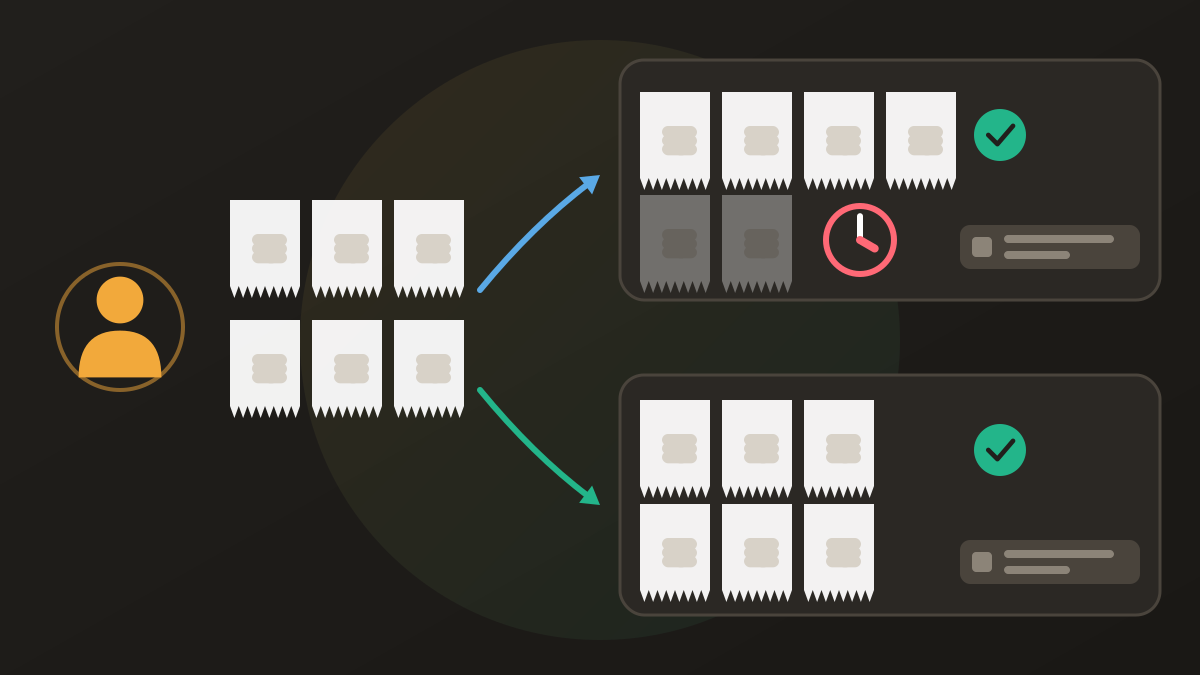
Ana, Ben, Cara and Dev rent a cabin for a weekend and split everything equally. Ana pays $640 for the cabin. Ben pays fuel and groceries, five expenses totalling $236. Cara pays four meals, $312. Dev pays four smaller costs, $108. That is fourteen expenses and $1,296, or $324 each.
| Paid | Share | Balance | |
|---|---|---|---|
| Ana | $640 | $324 | +$316 |
| Ben | $236 | $324 | −$88 |
| Cara | $312 | $324 | −$12 |
| Dev | $108 | $324 | −$216 |
Both apps settle this in three transfers: Dev pays Ana $216, Ben pays Ana $88, Cara pays Ana $12. With one person owed and three owing, three is the minimum; how debt simplification works shows why.
The difference is the logging. If Ana logs everything on Splitwise free — six expenses on Friday, five on Saturday, three on Sunday — she can add four, four and three: eleven of fourteen, with three waiting. The cap is per user, so if each person logs what they paid, nobody has more than five expenses to spread over three days, and the cap rarely bites. On Settle Up free, Ana logs all fourteen, with ads between screens.
Currencies, offline and the web
Currencies. Splitwise supports 100+ currencies, but converting them to one total is a Pro feature. Settle Up supports all currencies with exchange rates on the free version, and you can edit a rate or fix one for the whole trip. For a trip abroad that difference often decides it; splitting bills across currencies explains why the rate should be saved with each expense.
Offline. Splitwise supports offline entry. Settle Up says it works offline and syncs when you are back.
Web. Both have a web app. Settle Up also lets you share a group link so friends can view the balance in a browser without downloading anything, handy for the one friend who will not install an app.
Receipts and recurring bills
Receipts. Splitwise Pro reads a receipt photo and lets you assign the detected items to people. Settle Up Premium stores a receipt photo with the expense, but nothing reads it.
Recurring bills. Splitwise lets you create bills that repeat weekly, fortnightly, monthly or yearly on the free plan. On Settle Up, recurring and future expenses are Premium. A flatshare that logs rent and internet every month gets that free on Splitwise and pays for it on Settle Up.
Settle Up app review: where each one wins and loses
Settle Up wins on the free plan for a busy group: no cap, free conversion, offline use, and a browser view for people without the app. Group Premium is a fair way to buy features for one trip without anyone subscribing.
Settle Up loses on ads in the free version, recurring expenses kept in Premium, and receipts that are stored, not read.
Splitwise wins on its network, free recurring bills, a mature web app and, on Pro, receipt scanning with item-by-item splitting.
Splitwise loses on the four-a-day cap, ads, and currency conversion kept in Pro.
Which one to pick
A trip abroad, lots of small expenses, nobody wants to pay. Settle Up, or Splitwise if each person logs their own expenses and you can live without conversion.
A flatshare with rent and bills that repeat every month. Splitwise; its free recurring bills save the monthly retyping.
A group already on Splitwise. Stay unless the cap bites; moving costs more than the cap does. If you do move, switching from Splitwise covers how to carry the balances over.
One friend refuses to install anything. Settle Up’s browser link.
You want receipts read and items split. Splitwise Pro, or a free app that includes it.
Where Donget comes in
Donget is a third option for groups that want neither the cap nor the ads. It is free with no expense limit and no ads. Photograph the bill and tap Scan with AI, and it becomes a draft expense with its lines listed, and everyone can Claim a share of what they had. Each expense can be in the currency you paid, and Settle up suggests the fewest transfers, each recorded with Paid. It works offline and syncs later, and anyone not on Donget yet can be added with Add a name and pick that name when they join.
Where it loses: there is no web app, no recurring expenses, no multiple payers on one expense and no data export, and its network is smaller than Splitwise’s. The full field is in free Splitwise alternatives compared, and the head-to-head is on Donget vs Settle Up.
Frequently asked questions
Splitwise vs Settle Up: which is better?
For a free group that logs a lot, Settle Up: no daily cap and free currency conversion. For a group already on Splitwise, or anyone who wants free recurring bills, Splitwise. Both show ads on the free plan and both have a web app.
Is Settle Up free?
Yes: no cap on expenses, all currencies with exchange rates, offline use and a fewest-transfers settle-up. It shows ads; Premium removes them and adds receipt photos, recurring expenses, custom categories, statistics and Excel export.
Does Settle Up have a daily limit like Splitwise?
No. Settle Up’s free version has no cap. Splitwise’s free plan allows up to four expenses a day per user; Pro removes the cap.
How much does Settle Up Premium cost?
On the US App Store, $3.99 a month or $19.99 a year for one person. Group Premium, a one-time purchase for one group, runs from $5.99 for a week to $149.99 for a lifetime.
Can Splitwise or Settle Up scan receipts?
Splitwise can, on Pro, with item-by-item assigning. Settle Up stores receipt photos on Premium but does not read them. Donget reads receipts with AI for free.
Why do people switch from Splitwise to Settle Up?
Mostly for the free plan: no daily cap and free currency conversion. People who stay on Splitwise cite its network, free recurring bills and receipt scanning on Pro.
The bottom line
Settle Up gives a busy group more for free — no cap, free conversion — and asks for your attention in return. Splitwise keeps the network and free recurring bills and meters the rest. Pick Settle Up for trips and big groups, Splitwise for a settled flatshare already living in it, and check that your group’s busiest day fits the free plan you choose.
Download Donget free and log the whole trip with no cap, no ads and every receipt read for you.