Best party planning apps: invitations, who brings what and shared costs
Compare party planning apps for RSVPs, potluck sign-ups, shared jobs and costs. Choose between Partiful, SignUpGenius, Google Sheets and Donget.

The invitations are ready, but two people have offered dessert and nobody has sorted plates. Then the host asks whether the shopping is a gift or something everybody will share. The best party planning apps solve different parts of this problem, so start with the one your group actually has.
Choose Partiful for invitations and RSVPs, SignUpGenius for contribution slots, Google Sheets for a flexible shared plan, or Donget for shared jobs and expenses. Keep the guest list, contributions and money rules clear. A dish someone brings does not automatically reduce their share of other costs; agree that before people shop.
Choose party planning apps by the missing job
A small party has three lists: who is coming, who is bringing or doing what, and which costs people have agreed to share. They can overlap, but they answer different questions.
An RSVP confirms attendance. A contribution slot reserves something the party needs. An expense records a payment and the people responsible for it. Confusing them can leave the host with a full guest list, an empty shopping list and a bill nobody expected.
For six friends who already have a group chat, a single shared list may be enough. For a larger potluck, claimable slots help prevent duplicates. If guests buy shared supplies separately, a ledger makes reimbursements easier to check. Start with a who-brings-what list before adding tools to a plan that is already working.
Party planning tools compared
The table reflects official product information checked on 22 October 2026. These are suggested uses based on documented capabilities, rather than a ranking from hands-on testing.
| Tool | Useful for | Free starting point | What you still need to decide |
|---|---|---|---|
| Partiful | Event invitations, RSVPs and guest updates | Free invitation and RSVP tools | Which contributions are gifts or shared costs |
| SignUpGenius | Claimable food, item or volunteer slots | Basic sign-ups | Contribution quantities and any reimbursement arrangement |
| Google Sheets | A plan with your own columns and formulas | Create with a Google Account | Permissions, ownership and how to calculate balances |
| Donget | Named shared tasks, expenses and settle-up | Free app | Invitations, RSVPs and any deadline communication |
One tool may cover enough of the party. When you do use two, give each a clear purpose: for example, an RSVP link for attendance and one shared record for jobs and costs.
Partiful: when getting replies is the difficult part
Partiful is a useful starting point when people keep asking for the address or forgetting to confirm. Its official site describes event pages, guest questions and updates; its RSVP overview says guests can reply through a link without downloading an app.
That makes the invitation easier to share with a loose group of friends. A host can keep the details with the event rather than repeating them in several conversations. Guest questions can also collect information relevant to the plan, such as dietary preferences, without treating an RSVP as a promise to buy something.
The trade-off: an invitation does not settle who is doing the preparation or whether guests are contributing money. Add an explicit arrangement for shared purchases. Also distinguish an ordinary invitation from paid event or ticket features; an app offering invitations is not a promise that every way of collecting money is free.
Use it when your main uncertainty is attendance. If everybody has already confirmed and your only question is who will collect the chairs, another invitation page may add little.
SignUpGenius: when you need particular contributions
SignUpGenius is useful when “bring something” is too vague. Its potluck guide describes creating dish slots, setting how many are needed and letting guests claim them without creating an account. That gives an organiser a way to request two salads rather than accept five desserts by accident.
Its free-plan guidance confirms a Basic option with core sign-up features and automatic confirmations and reminders. Premium features include removing ads and additional administration options. Collecting money can involve transaction fees, including on a free account.
The trade-off: a slot is a contribution commitment, not an agreed reimbursement formula. If somebody claims “dessert”, say whether they are bringing it as a gift or buying it for the group. Do not ask for receipts afterwards if the invitation originally sounded like a potluck where people simply contributed a dish.
For a small gathering, defining every plate and napkin as a slot can be more work than the party needs. Reserve the structure for contributions whose quantity or ownership matters.
Google Sheets: when the group wants its own layout
A Sheet can hold a guest list, an item list, an owner column and a shared-cost tab in the same file. Google’s Sheets overview confirms that anyone with a Google Account can create a spreadsheet and that collaborators can edit together. Its help pages explain checkboxes and sharing permissions.
That flexibility suits a group with an unusual plan: perhaps one person is collecting borrowed furniture, another is making decorations and a third is tracking shopping. Use a separate column for “promised” and “actually paid” rather than treating the estimated shopping amount as a bill.
The trade-off: you build and maintain the process. A checkbox does not assign an owner unless there is a name beside it, and a total-spend formula does not necessarily calculate who owes whom. Choose who can edit and keep personal guest details out of a broadly shared link.
Our shared expense spreadsheet guide explains the money side. A sheet is a reasonable choice when somebody wants to maintain it; it should not quietly turn into another job the host never agreed to take on.
Donget: when jobs and shared purchases belong together
Donget is useful when friends are preparing the party together and several people will pay for agreed supplies. A group has Money and Tasks. Under Tasks, use Add task, give the job to one or more people, or leave it Open for someone to take. This keeps “collect the chairs” separate from “buy the shared groceries”.
A task being finished does not create a debt. After you finish a task called Buy party supplies, the completion flow can offer Spent money on Buy party supplies?. Add expense pre-fills the title only. Enter the actual amount and choose the participants yourself. If the buyer bought personal items on the same trip, those do not become party expenses merely because the task is complete.
The trade-off: Donget has no event invitation or RSVP page, task due dates, automatic task reminders or quantity-based contribution slots. It does not collect or transfer money. Choose an invitation or slot tool when that is the job you need; use the shared expense record only for purchases the group agreed to share.
A party example: a gift stays outside the shared pot
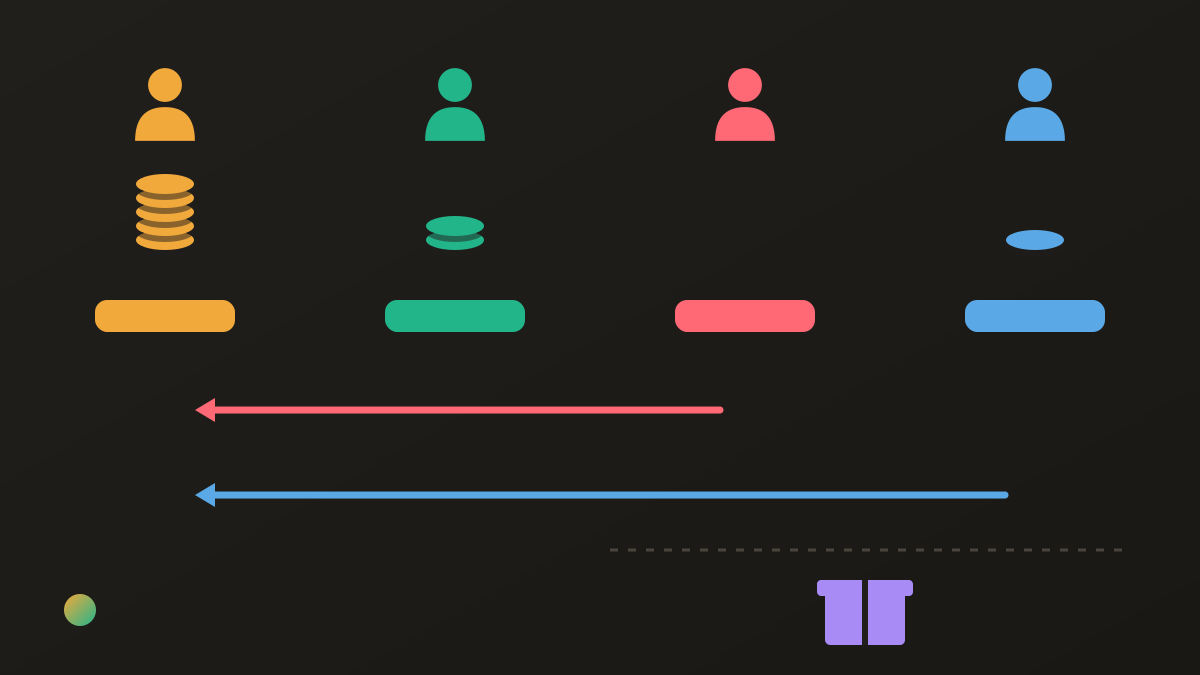
Four friends agree to split the party’s shared costs equally. Ana pays €150 for food, Ben pays €60 for drinks and Cleo pays nothing towards the shared purchases. Dev pays €30 for shared supplies. Cleo also brings a €24 homemade-dish contribution as a gift, with no reimbursement expected.
The shared total is €240, so each person’s share is €60. The gift is outside that calculation; it is neither an extra bill for everyone nor an automatic credit against Cleo’s €60 share.
| Person | Paid towards the €240 shared total | Agreed share | Settlement |
|---|---|---|---|
| Ana | €150 | €60 | Receives €90 |
| Ben | €60 | €60 | Nothing left to pay or receive |
| Cleo | €0 | €60 | Sends Ana €60 |
| Dev | €30 | €60 | Sends Ana €30 |
After those two transfers, each has funded €60 of shared purchases. Cleo’s total outlay is €84 including the voluntary gift. If the group wanted the dish reimbursed instead, they would need to agree to include its cost and recalculate; changing the label after the party is how a simple plan becomes an argument.
This example does not prescribe equal splitting for every party. The house-party cost guide covers agreeing participants and costs, while the holiday dinner guide separates hosting, food contributions and purchases. What matters is that the invitation, contribution list and ledger all describe the same agreement.
FAQ
What is the best party planning app?
Choose by the part of the party you need to organise. Partiful handles invitations and RSVPs, SignUpGenius handles contribution slots, Google Sheets gives you a flexible shared plan, and Donget keeps shared tasks and expenses together. A small party may need only one of these.
Which party planning apps have a free option?
Partiful offers free invitation and RSVP tools, SignUpGenius has a free Basic plan, and anyone with a Google Account can create a Sheet. Donget is free for shared tasks and expenses. Paid features or payment-processing charges can still apply to other services, so check before collecting money.
What app can organise who brings food to a party?
SignUpGenius lets an organiser create contribution slots that guests can claim. Donget lets you assign named tasks or leave them open for people to take, while a shared Sheet can hold a simple name-and-item list. Pick slots when you need a set number of contributions.
Do guests need an app to RSVP on Partiful?
Partiful says guests can RSVP through an invitation link without downloading its app. That helps when the immediate job is getting a guest list rather than persuading everybody to join another app.
Does bringing a dish mean someone owes less money?
Only if the group agreed that arrangement. Decide whether each contribution is a gift, a reimbursable purchase or part of a planned cost allowance. A claimed food slot or completed task does not by itself change anybody’s share of shared expenses.
Does Donget send party invitations or manage RSVP lists?
No. Donget handles shared jobs, expenses and settle-up rather than event invitations or RSVPs. It has no contribution-slot quantities or task due dates, so use an invitation or sign-up tool if those are what your party needs.
The bottom line
Choose an invitation tool for replies, a slot tool for contributions, or a shared plan when your group wants its own layout. If several friends are buying supplies, agree the money rule before shopping and keep one record of the actual costs. Mark a gift as a gift before it reaches the table.
Download Donget free and organise the party’s shared jobs and expenses in one group.